

Turso
Learn how to use Prisma ORM with Turso SQLite
This guide discusses the concepts behind using Prisma ORM and Turso, explains the commonalities and differences between Turso and other database providers, and leads you through the process for configuring your application to integrate with Turso.
There's a Turso preview feature that integrates with Prisma CLI workflows. See the GitHub discussion and share feedback there.
What is Turso?
Turso is an edge-hosted, distributed database that's based on libSQL, an open-source and open-contribution fork of SQLite, enabling you to bring data closer to your application and minimize query latency. Turso can also be hosted on a remote server.
Commonalities with other database providers
libSQL is 100% compatible with SQLite. libSQL extends SQLite and adds the following features and capabilities:
- Support for replication
- Support for automated backups
- Ability to embed Turso as part of other programs such as the Linux kernel
- Supports user-defined functions
- Support for asynchronous I/O
To learn more about the differences between libSQL and how it is different from SQLite, see libSQL Manifesto.
Many aspects of using Prisma ORM with Turso are just like using Prisma ORM with any other relational database. You can still:
- model your database with the Prisma Schema Language
- use Prisma ORM's existing
sqlitedatabase connector in your schema - use Prisma Client in your application to talk to the database server at Turso
Differences to consider
There are a number of differences between Turso and SQLite to consider. You should be aware of the following when deciding to use Turso and Prisma ORM:
- Remote and embedded SQLite databases. libSQL uses HTTP to connect to the remote SQLite database. libSQL also supports remote database replicas and embedded replicas. Embedded replicas enable you to replicate your primary database inside your application.
- Making schema changes. Since libSQL uses HTTP to connect to the remote database, this makes it incompatible with Prisma Migrate. However, you can use
prisma migrate diffto create a schema migration and then apply the changes to your database using Turso's CLI.
How to connect and query a Turso database
The subsequent section covers how you can create a Turso database, retrieve your database credentials and connect to your database.
How to provision a database and retrieve database credentials
Ensure that you have the Turso CLI installed to manage your databases.
If you don't have an existing database, you can provision a database by running the following command:
turso db create turso-prisma-dbThe above command will create a database in the closest region to your location.
Run the following command to retrieve your database's connection string:
turso db show turso-prisma-dbNext, create an authentication token that will allow you to connect to the database:
turso db tokens create turso-prisma-dbUpdate your .env file with the authentication token and connection string:
TURSO_AUTH_TOKEN="eyJhbGciOiJFZERTQSIsInR5cCI6IkpXVCJ9..."
TURSO_DATABASE_URL="libsql://turso-prisma-db-user.turso.io"
How to connect to a Turso database
To get started, install the Prisma ORM driver adapter for libSQL packages:
npm install @prisma/adapter-libsqlUpdate your Prisma Client instance:
import { PrismaClient } from "../prisma/generated/client";
import { PrismaLibSQL } from "@prisma/adapter-libsql";

const adapter = new PrismaLibSQL({
  url: `${process.env.TURSO_DATABASE_URL}`,
  authToken: `${process.env.TURSO_AUTH_TOKEN}`,
});
const prisma = new PrismaClient({ adapter });
You can use Prisma Client as you normally would with full type-safety in your project.
Manage schema changes with Turso
Prisma CLI commands such as prisma migrate dev or prisma db push require a local SQLite connection. To roll out schema changes to Turso, use this workflow:
- Configure Prisma CLI to target a local SQLite file.
Update.envandprisma.config.tsso Prisma CLI commands write to the local file instead of your remote Turso database:
LOCAL_DATABASE_URL="file:./dev.db"import "dotenv/config";
import { defineConfig, env } from "prisma/config";
export default defineConfig({
schema: "prisma/schema.prisma",
migrations: {
path: "prisma/migrations",
},
datasource: {
url: env("LOCAL_DATABASE_URL"),
},
});-
Generate migrations locally.
Runprisma migrate dev --name <migration-name>to update the local SQLite database and produce SQL files inprisma/migrations. -
Apply the generated SQL using the Turso CLI.
Use theturso db shellcommand to run the SQL against your remote database (replacetestwith your database name):
turso db shell test < ./prisma/migrations/20251118131940_init/migration.sqlReplace the database name (test) and migration folder (20251118131940_init) with the values produced by prisma migrate dev.
Embedded Turso database replicas
Turso supports embedded replicas. Turso's embedded replicas enable you to have a copy of your primary, remote database inside your application. Embedded replicas behave similarly to a local SQLite database. Database queries are faster because your database is inside your application.
How embedded database replicas work
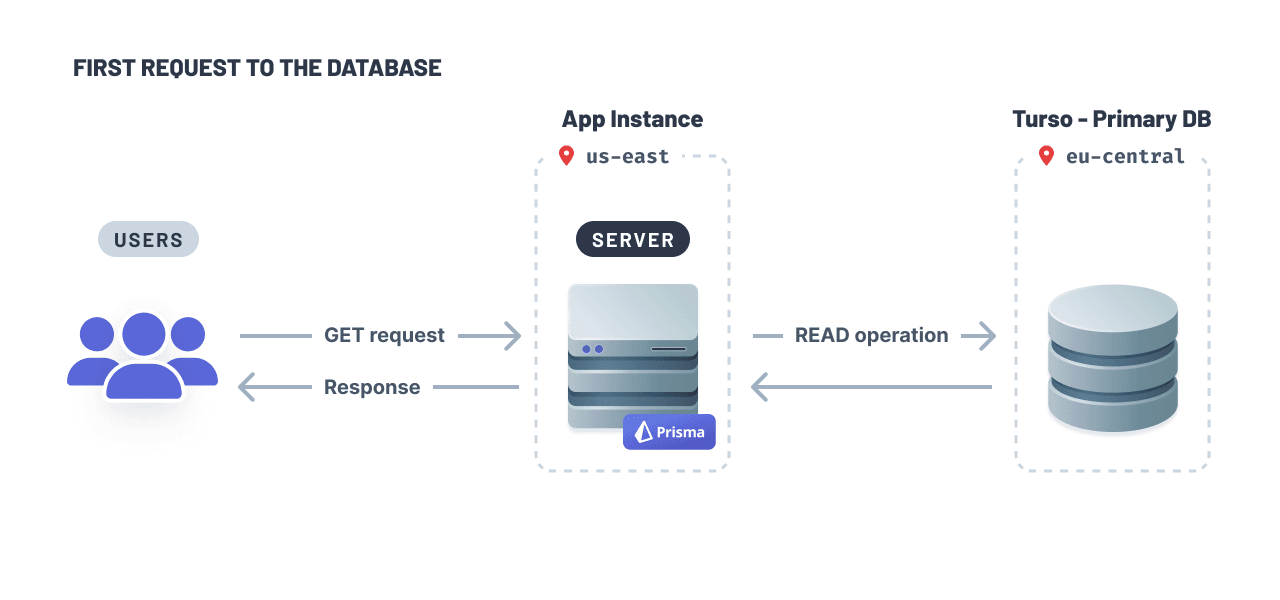
When your app initially establishes a connection to your database, the primary database will fulfill the query:
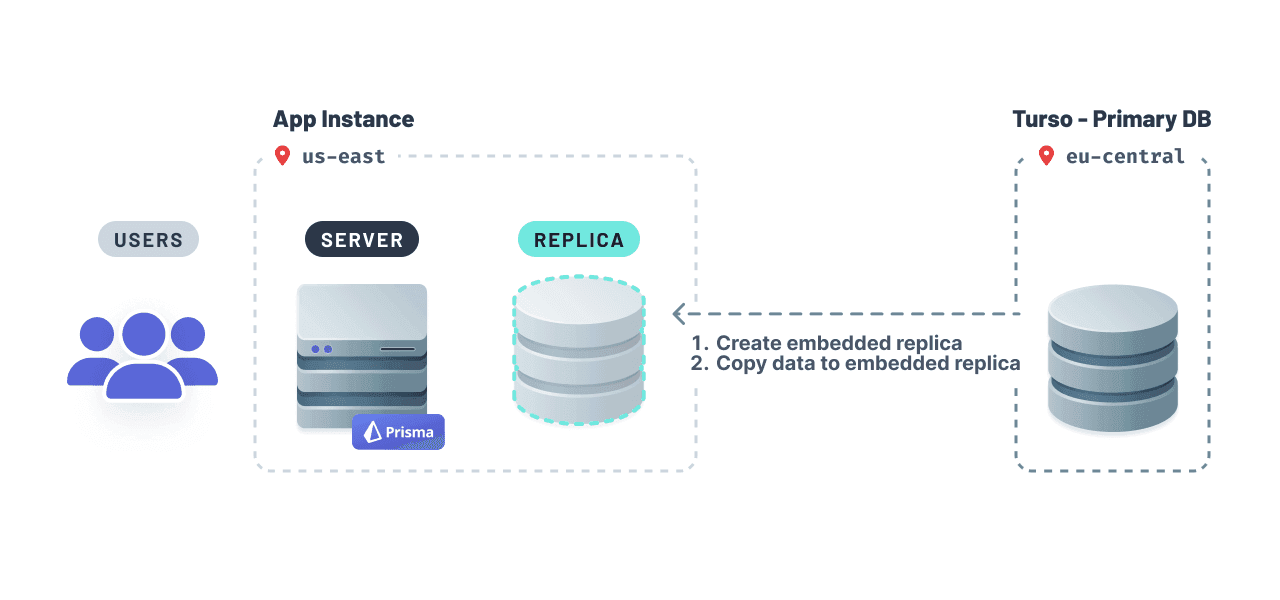
Turso will (1) create an embedded replica inside your application and (2) copy data from your primary database to the replica so it is locally available:
The embedded replica will fulfill subsequent read queries. The libSQL client provides a sync() method which you can invoke to ensure the embedded replica's data remains fresh.
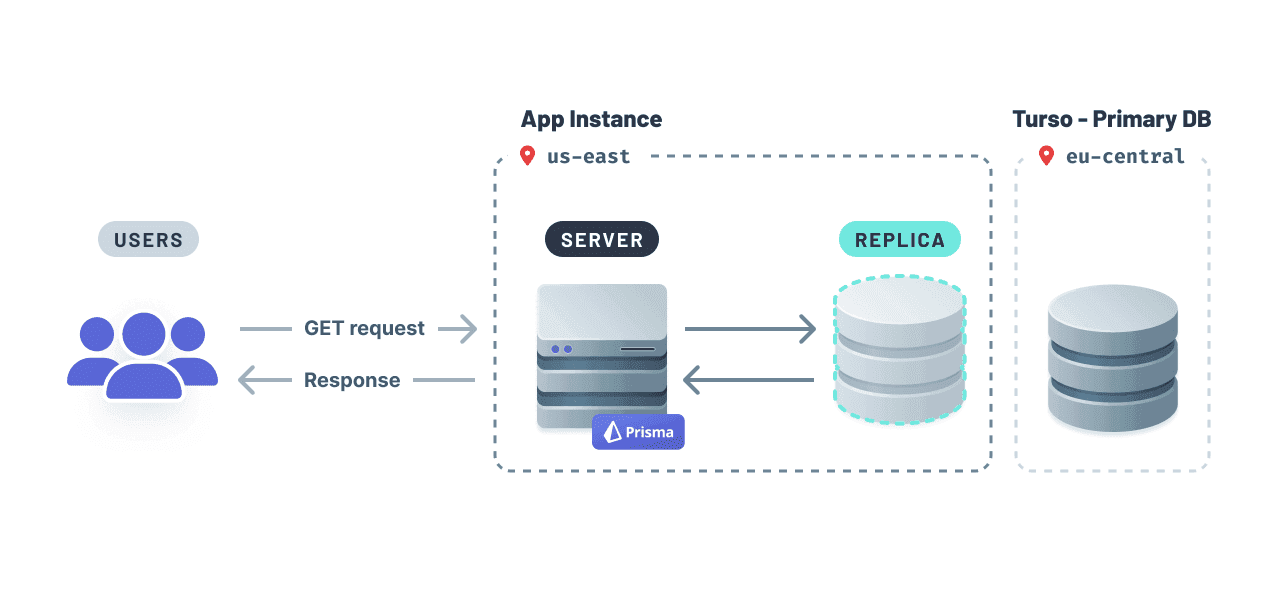
With embedded replicas, this setup guarantees a responsive application, because the data will be readily available locally and faster to access.
Like a read replica setup you may be familiar with, write operations are forwarded to the primary remote database and executed before being propagated to all embedded replicas.
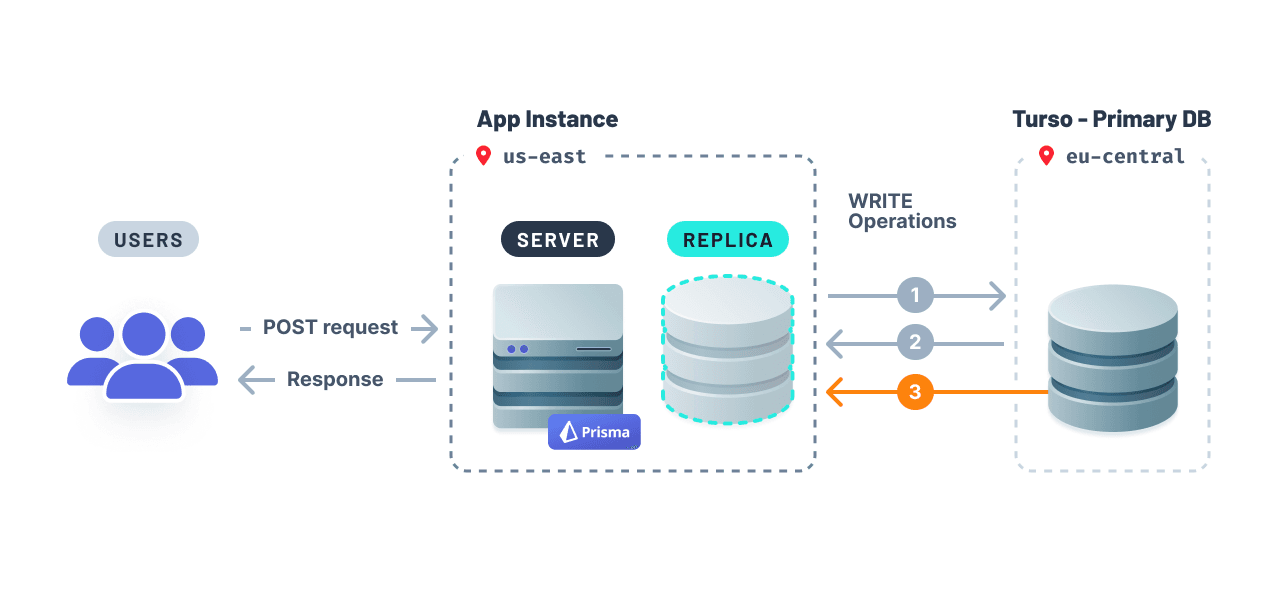
- Write operations propagation are forwarded to the database.
- Database responds to the server with the updates from 1.
- Write operations are propagated to the database replica.
Your application's data needs will determine how often you should synchronize data between your remote database and embedded database replica. For example, you can use either middleware functions (e.g. Express and Fastify) or a cron job to synchronize the data.
How to synchronize data between your remote database and embedded replica
To get started using embedded replicas with Prisma ORM, add the sync() method from libSQL in your application. The example below shows how you can synchronize data using Express middleware.
import express from "express";
const app = express();

// ... the rest of your application code
app.use(async (req, res, next) => {
  await libsql.sync();
  next();
});

app.listen(3000, () => console.log(`Server ready at http://localhost:3000`));
It could be also implemented as a Prisma Client extension. The below example shows auto-syncing after create, update or delete operation is performed.
const prisma = new PrismaClient().$extends({
  query: {
    $allModels: {
      async $allOperations({ operation, model, args, query }) {
        const result = await query(args);

        // Synchronize the embedded replica after any write operation
        if (["create", "update", "delete"].includes(operation)) {
          await libsql.sync();
        }

        return result;
      },
    },
  },
});